For remote teams, this creates a real problem. When employees are scattered across locations, tracking billable hours, managing overtime, and maintaining leave accrual records is significantly harder without the right tools. Add in Washington's overtime rules under RCW 49.46.130 — 1.5x pay after 40 hours per workweek — and the margin for payroll errors shrinks fast. In FY 2024, FLSA violations resulted in $149.9 million in back wages for over 125,000 employees nationally.
This guide covers the five best time tracking apps for Washington remote teams, what to look for in each, and how to choose the right fit for your operation.
Key Takeaways
- Washington's paid sick leave law (RCW 49.46.210) makes hour tracking a legal obligation for most employers with remote workers
- The strongest options in 2025 are Harvest, Clockify, Toggl Track, Hubstaff, and DeskTime — sized for teams from solo freelancers to 50+ employees
- Clockify offers the most capable free tier; Hubstaff leads on payroll automation and compliance depth
- Match your tool to your billing model: invoicing for client-billing teams, overtime and PTO tracking for compliance-focused employers
- Test free tiers before committing, and confirm your chosen tool supports Washington overtime settings
Why Time Tracking Matters for Washington Remote Employers
The Legal Baseline
Washington's paid sick leave law covers most employees — full-time, part-time, seasonal, and temporary workers. Employees accrue leave based on hours worked, and L&I requires employers to keep records for at least three years, tracking hours worked each day and each workweek. Remote workers face the same requirements as on-site employees.
Washington's overtime rules add another layer. RCW 49.46.130 requires at least 1.5 times the regular rate for covered employees working more than 40 hours in a workweek (including agricultural workers as of January 1, 2024).
The Operational Gap
Beyond compliance, remote work creates a visibility problem. Without structured hour tracking, managers lose the ability to:
- Spot overloaded employees before they burn out
- Control labor costs across distributed projects
- Verify fair workload distribution across team members
- Generate accurate payroll without manual reconciliation
Industries with hourly or task-based workforces carry the highest compliance risk when time tracking is informal. This is especially true in cannabis cultivation, where multi-person grow teams log hours across rotating tasks and rooms — and Washington L&I has no tolerance for incomplete records.
Best Time Tracking Apps for Remote Employees in Washington
These five tools were selected for remote-first usability, pricing transparency, mobile accessibility, and relevance to Washington's labor compliance environment.
Harvest
Harvest is a cloud-based time tracking and invoicing tool built around project-based billing. It's a natural fit for freelancers and small-to-mid-sized remote teams who bill clients by the hour and need invoicing tied directly to tracked time.
For Washington remote teams, Harvest's standout features include:
- Project budget alerts that flag spending before overruns occur
- Invoice generation directly from tracked hours, reducing manual billing work
- Integrations with QuickBooks and Jira (70+ tools total), connecting time data to accounting and project management
- iOS and Android mobile apps for tracking time on the go
One important gap: Harvest has no native PTO or leave accrual tracking. Washington employers using Harvest will need to pair it with HR software or use manual workarounds like internal non-billable projects for sick time.
| Key Features | Project time tracking (timer + manual entry), team reporting, invoicing, budget alerts, 70+ integrations |
| Pricing | Free (1 user, 2 projects); Teams at $11/seat/month ($9/seat billed annually) |
| Best For | Freelancers and small remote teams billing clients by the hour |
Clockify
Clockify is one of the most widely adopted free time tracking tools available, offering timer-based and manual tracking, automatic timesheets, and kiosk mode for shared devices. It scales from solo operators to large distributed teams without requiring an immediate budget commitment.
Its free tier supports basic time tracking and reports. Washington employers should note that billable rate reporting and overtime/attendance tracking are features on paid tiers (Basic and Standard, respectively) — not the free plan. PTO and time-off management is available on Standard and above.
| Key Features | Timer + manual tracking, automatic timesheets, kiosk mode, 100+ integrations, billable/non-billable reports (paid) |
| Pricing | Free tier available; paid plans from $3.99/user/month (billed annually) |
| Best For | Budget-conscious remote teams or organizations scaling up tracking without heavy upfront investment |
For teams prioritizing overtime compliance and leave tracking on a tight budget, upgrading to Clockify's Standard tier ($5.49/user/month annually) gives access to both features at roughly $66/seat per year.
Toggl Track
Toggl Track takes a low-friction approach: its one-click timer is easy to use, which matters for distributed teams where forgotten timers are a constant problem. The desktop app includes automatic activity tracking, while mobile apps support manual logging on iOS and Android.
What sets it apart for Washington remote teams:
- Billing rate assignment per project or client, useful for teams billing at different rates
- Detailed project/client/task reporting for clean payroll and client billing reconciliation
- Pomodoro timer built into the browser extension for structured work sessions
- 100+ integrations including Trello, Jira, and Salesforce
| Key Features | Automatic (desktop) + manual (mobile) tracking, billing rates, payroll management, project reporting, 100+ integrations |
| Pricing | Free (up to 5 users); Starter at $9/user/month; Premium at $18/user/month (billed yearly) |
| Best For | Remote teams of 2–20 needing straightforward time and billing visibility |
Hubstaff
Hubstaff combines time tracking with GPS location tracking, employee activity monitoring, automated payroll processing, and project budget controls in a single platform. It's built for employers managing larger or field-based remote teams where payroll accuracy and activity visibility are priorities.
For Washington employers specifically, Hubstaff's automated overtime detection and per-employee pay rate assignment address the overtime compliance requirements under RCW 49.46.130 directly. The platform sends approved hours to payroll providers including PayPal, Wise, and Bitwage.
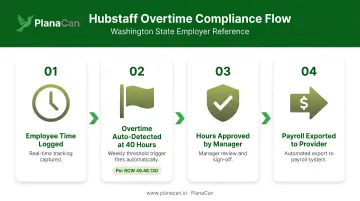
One important consideration: Hubstaff's monitoring features — customizable screenshot frequency, app and URL tracking, activity rate scoring — are more invasive than other tools on this list. Washington employers should disclose these practices to employees and obtain appropriate acknowledgment, particularly given RCW 9.73.030, which addresses consent requirements around recorded communications.
| Key Features | GPS + manual time tracking, activity monitoring, automated payroll, project budget tracking, 35+ integrations |
| Pricing | Starter at $7/user/month ($5.83 annually); Grow at $9/user/month ($7.50 annually); Team at $12/user/month ($10 annually) |
| Best For | Mid-to-large remote teams requiring payroll automation and activity-level visibility |
DeskTime
DeskTime takes a different approach from the others — it records time automatically without requiring employees to start timers. The app logs arrival and departure times, classifies app and website usage as productive or unproductive, and tracks offline time for employees who work in low-connectivity environments.
Two features make DeskTime stand out for Washington remote teams:
- Offline time tracking captures hours even without an internet connection — useful for employees in rural or low-connectivity areas of Washington
- Private Time mode lets employees pause tracking when needed, giving them control that fully invasive tools don't provide
DeskTime currently offers a 14-day free trial rather than an ongoing free plan. Verified pricing shows Pro at $6.42/user/month and Premium at $9.17/user/month (billed annually).
| Key Features | Automatic time recording, app/URL classification, offline tracking, private time mode, Pomodoro timer, Asana/Trello/Jira integrations |
| Pricing | 14-day free trial; Pro at $6.42/user/month; Premium at $9.17/user/month (billed annually) |
| Best For | Remote teams wanting automatic, low-friction tracking with productivity insights |
How to Choose the Right Tool for Your Washington Team
The Four Criteria That Matter
Selection should come down to four factors — not feature count:
- Remote usability — mobile app availability, offline capability, ease of daily adoption
- Washington compliance fit — overtime threshold settings, PTO/leave tracking, recordkeeping export
- Pricing transparency — per-seat costs at your actual team size, not just the entry price
- Integration depth — connection to your payroll system and project management tools
Match Tool to Billing Model
| Your Priority | Best Options |
|---|---|
| Client billing and invoicing | Harvest, Toggl Track |
| Overtime and PTO compliance | Hubstaff, Clockify (Standard+) |
| Automatic tracking, minimal friction | DeskTime, Toggl Track |
| Free or low-cost starting point | Clockify, Toggl Track (Free) |
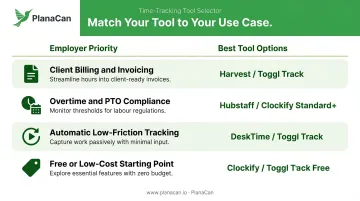
The most common mistake Washington employers make is choosing based on feature volume rather than operational fit. A five-person professional services team doesn't need Hubstaff's GPS tracking and screenshot monitoring — and introducing that level of surveillance without proper disclosure creates more compliance risk than it addresses.
Instead, start with your team's primary use case. If client billing drives revenue, invoicing capability matters more than productivity scoring. If hourly compliance is your main exposure, prioritize overtime detection and leave tracking above everything else.
A Note for Washington Cannabis Cultivators
Generic time tracking tools handle hour logging — but cannabis grow operations have accountability requirements that go beyond clocking in and out. Strain-specific task sequences, phase-day scheduling, and multi-room harvest coordination don't map onto a flat timesheet.
For licensed Washington cultivators managing remote grow workers, PlanaCan pairs with time tracking tools to fill that gap. The platform is built specifically for commercial cannabis operations where generic tools fall short. Key capabilities include:
- Automated scheduling tied to phase-day logic
- Daily task notifications pushed to iOS and Android devices
- Harvest-cycle tracking across multiple rooms
- Labor analytics by task, strain, and batch
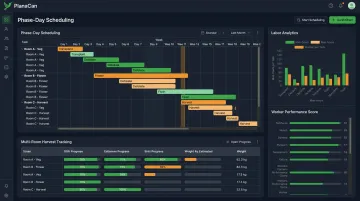
Pairing a time tracking tool — Clockify or Hubstaff for compliance depth — with PlanaCan gives Washington grow teams the legal recordkeeping and harvest-cycle accountability that a single tool alone can't deliver.
Frequently Asked Questions
Can Harvest track PTO?
Harvest has no native PTO or paid leave accrual feature. Washington employers needing leave tracking should pair Harvest with HR software, or switch to Hubstaff or Clockify (Standard plan) which include dedicated time-off management.
Is Harvest time tracking free?
Harvest's free plan supports one user and two projects, which works for solo freelancers but falls short for remote teams. Paid plans start at $11/seat/month (or $9/seat billed annually) and unlock unlimited projects and team features.
Does Harvest have a mobile time-tracking app?
Yes. Harvest has iOS and Android apps that let users start and stop timers or log time manually from anywhere, making it functional for remote employees in the field.
Do Washington employers legally need to track remote employee hours?
Washington's paid sick leave law (RCW 49.46.210) requires tracking hours worked by most non-exempt employees — including remote workers — to accurately calculate leave accrual. L&I also requires employers to maintain records of daily and weekly hours for at least three years.
What is the best free time tracking app for remote teams in Washington?
Clockify is the strongest free option. Its free tier supports multiple users and basic tracking, while the Standard plan ($5.49/user/month annually) adds overtime reporting and time-off management, both directly relevant to Washington compliance.
What time tracking features matter most for Washington remote employees?
Three features matter most for Washington compliance:
- Overtime and hour threshold alerts to stay within RCW 49.46.130 requirements
- Mobile app access for employees working across multiple locations
- PTO tracking or exportable leave data to support paid sick leave accrual recordkeeping