A grow journal template is the structured solution. Any grower can jot down observations, but a well-designed template is what turns raw data into repeatable results. The difference between a useful template and an unused one comes down to three things: structure, completeness, and fit for your operation's size and complexity.
Key Takeaways
- A cannabis grow journal template is a reusable framework built once and deployed every cycle — not a one-off log
- Templates enforce consistency across strains, rooms, and team members where ad-hoc notes can't
- Each template must cover pre-grow setup, stage-by-stage observations, and post-harvest review
- Format choice — paper, spreadsheet, or software — should match your operation's scale and team size
- Without accountability fields — who logged what, task status, deviation flags — your template won't drive team ownership
What Is a Cannabis Grow Journal Template and Why It Matters
Journal vs. Template: A Critical Distinction
A grow journal is the filled-in record of one specific cycle. A grow template is the reusable blank framework you build before each cycle — designed to be completed consistently across every run.
The template is created once and refined over time. The journal is what you get when a template meets a live grow. That distinction matters because a template imposes structure before things go wrong, not after.
Why This Gap Hurts Commercial Operations
When you're managing five rooms and several strains simultaneously, inconsistent record-keeping makes it nearly impossible to trace yield differences or repeat a successful run. Research published in 2025 found that elevated relative humidity during flowering (78–98% RH) produced low VPD of 0.62–0.25 kPa, delayed flowering by 3 weeks, and reduced total biomass by 75.3% — a catastrophic outcome that only shows up in the data if your team was tracking environmental conditions at all.
The Compounding Value of Standardized Templates
Catching those problems early requires consistency across every run. With each harvest, the same template gives you comparable data sets — and over time, you can identify:
- Which strain-to-nutrient combinations outperform
- Which environmental ranges correlate with pest pressure
- Which process steps your team most commonly skips
For commercial operations, that accumulated data is what separates reactive troubleshooting from deliberate, repeatable improvement.
How to Create a Cannabis Grow Journal Template Step by Step
Step 1: Define the Scope
Before designing anything, decide what your template needs to cover:
- Is this for one strain in one room, or does it need to work across multiple strains and rooms?
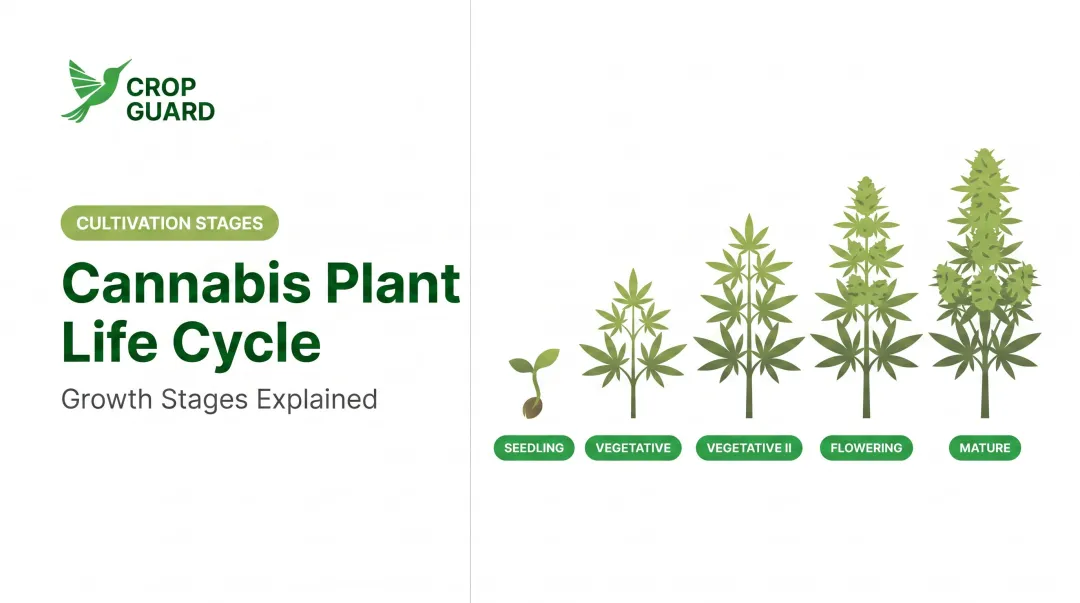
- Which cultivation stages apply to your operation: propagation, vegetative, flowering, harvest, drying, curing?
For commercial operations, a template with a standardized core structure plus strain-specific header fields will serve better than rebuilding from scratch each time. Confirm your stages before building any sections — each one has distinct data points that matter.
Step 2: Choose the Right Format
Three options exist, each with real tradeoffs:
| Format | Strengths | Weaknesses |
|---|---|---|
| Paper/printed forms | Low-tech, accessible | Easy to lose, hard to analyze, no team sync |
| Spreadsheets | Better for data comparison | No notifications, version drift, no mobile execution |
| Cultivation management software | Multi-room deployment, task assignment, automatic alerts | Requires onboarding and subscription |
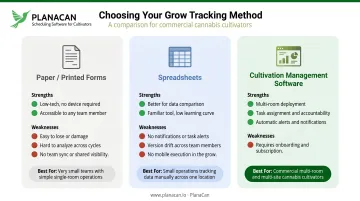
For operations managing more than one room or more than two staff, a digital format becomes necessary for maintaining accountability. According to Cannabis Business Times, 54% of cultivators already use cultivation-specific software — that majority reflects an industry that has largely moved on from spreadsheets and paper logs.
PlanaCan's custom template builder lets commercial grow teams build templates for every strain and cultivation step. Schedule them on an interactive Gantt chart in a few clicks, and the platform pushes automatic daily notifications to each team member so nothing gets missed.
Step 3: Build Your Core Structure
Organize the template into clearly labeled sections corresponding to each growth stage (detailed in the next section). Every section should include a consistent header row:
- Date
- Week number
- Growth stage
- Staff member responsible for the entry
Standardize your units before deploying. If one grower records temperature in Fahrenheit and another in Celsius, or one tracks EC while another tracks PPM, cross-cycle comparisons become unreliable. Define all units and formats once, upfront.
Step 4: Add Accountability and Review Fields
Once your data structure is consistent, the next layer is accountability. Most templates record what was observed — commercial operations also need to capture:
- Who performed the task
- Whether it was completed on schedule
- What corrective action was taken if something was off-target
Add a "flag for review" field in each section so any abnormal reading — a pH spike, a pest observation, unexpected stretch — gets escalated to the lead grower without requiring a full audit of the log.
Step 5: Build a Post-Harvest Review Section
This is the most skipped and most valuable part of any template. It should capture:
- Final dry yield per plant or room
- Average harvest quality rating
- Key deviations from the expected cycle
- Top 3 changes to make in the next run
Without this section, growers complete the log but never close the loop. The data stays trapped in the current cycle instead of shaping the next one — and the same avoidable problems repeat.
Essential Sections Every Cannabis Grow Journal Template Needs
Pre-Grow Setup
Capture your baseline conditions before the first seed goes in the ground. This section anchors every future data point to the exact conditions of that run.
Fields to log:
- Strain name and genetics (indica/sativa/hybrid, photoperiod or autoflower)
- Seed or clone source
- Grow medium
- Room or canopy size
- Lighting type and intensity
- Start date
Environmental Tracking (Per Week)
Include fields for:
- Day/night temperature range
- Relative humidity range
- VPD target vs. actual
- CO2 levels (if applicable)
- Airflow/fan settings and any HVAC changes
Record data as a range, not a single snapshot. A single mid-day reading doesn't show how much variation your plants actually experienced across 24 hours.
Nutrient and Feeding Log
Environmental stability sets the ceiling — but feeding determines whether your plants reach it.
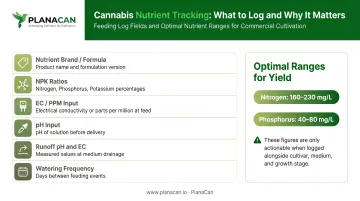
Fields to log:
- Nutrient brand and formula
- NPK ratios
- EC/PPM of input solution
- pH of input solution
- Runoff pH and EC
- Watering frequency
A 2021 study found inflorescence yield dropped sharply outside 160–230 mg/L nitrogen and 40–80 mg/L phosphorus — but those numbers are only useful if you're logging feed concentration, cultivar, medium, and growth stage together, not just the recipe alone.
Plant Health and Observation Log (Stage-by-Stage)
Weekly fields for:
- Plant height and canopy width
- Node development
- Training techniques applied (topping, LST, SCROG)
- Visible deficiencies or stress signs (with photo reference)
- Pest or disease observations with treatment response
Harvest and Post-Harvest Log
Fields to log:
- Harvest date and trichome maturity at harvest
- Wet weight
- Drying conditions (temp, RH, duration)
- Cure conditions (jar humidity, burping schedule)
- Final dry weight
- Qualitative rating of bud density, aroma, and appearance
A 2022 scientific review identifies drying as the most important cannabis post-harvest operation, citing common industrial conditions of 18–21°C and 50–55% RH — fields worth capturing explicitly.
Key Variables to Track at Each Growth Stage
Not all data points matter equally at every stage. Tracking the right variables at the right time reduces overwhelm and improves entry quality.
Propagation and Early Veg
- Medium moisture
- Root zone temperature
- Humidity
- Germination or root formation timeline
Mid-to-Late Veg
- Canopy development rate
- Light intensity at canopy level
- Training interventions applied
Flowering
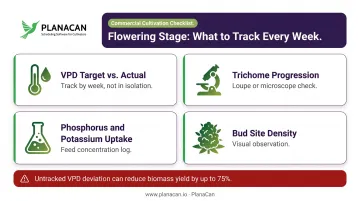
The most consequential stage for environmental records. Small VPD errors compounded across 8 weeks add up — the 2025 research cited earlier documented a 3-week flowering delay and near-75% biomass reduction from sustained humidity deviation. Track VPD closely, not just temperature in isolation.
Key variables:
- VPD target vs. actual (by week)
- Trichome progression (loupe or microscope)
- Phosphorus and potassium uptake levels in the feed
- Bud site density observations
Drying and Curing
Most growers skip the curing log entirely — and most post-harvest quality failures trace back to cure conditions that were never recorded. Track:
- Room temperature and RH during drying
- Humidity inside sealed cure jars (via digital hygrometer lids or two-way humidity packs)
- Time elapsed per drying and curing phase
- Batch ID for traceability
Common Mistakes Growers Make When Building Grow Journal Templates
Building a template that's too detailed to actually fill out Many first attempts include every possible field — resulting in 30+ data points per entry that team members skip under time pressure. Start leaner than you think you need. Capture the minimum viable dataset for each stage and add fields after one cycle reveals gaps.
Creating separate, non-standardized templates for each strain or room When templates differ in structure or field naming across rooms, cross-cycle data comparison becomes impossible. Use a single standardized core template with strain-specific or room-specific modifier fields — not completely different documents — so you can actually compare data across your operation.
Skipping team accountability fields In commercial operations, the grow journal is a team document. A template without assigned ownership creates ambiguity and gaps. Adding a simple "logged by" field and a task status column to each entry dramatically improves follow-through and makes it easy to trace data quality issues back to their source.
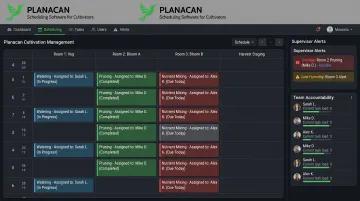
PlanaCan is built around this problem: per-user task attribution, role-based access, and supervisor alerts for overdue tasks make it clear who logged what and when. After implementing PlanaCan's standardized workflows, Garden First Cannabis saw a 36% increase in completed tasks and a 23% decrease in labor costs while managing 16 rotating harvests simultaneously.
Frequently Asked Questions
What should be included in a cannabis grow journal template?
A complete template covers pre-grow setup (strain, medium, lighting), stage-by-stage environmental and nutrient logs, plant health observations, and a post-harvest review with yield and quality notes. For commercial teams, accountability fields — who logged each entry and task completion status — are equally essential.
What is the difference between a grow journal and a grow journal template?
A journal is the filled-in record of one specific grow cycle. A template is the reusable blank framework you set up before each cycle, designed to be completed consistently across every run so data is comparable grow over grow.
How often should you update a cannabis grow journal?
Daily entries are ideal during critical stages like late flowering and early cure. For most commercial operations, a consistent weekly entry cadence with daily flagging of any abnormal observations is a practical standard that balances thoroughness with team capacity.
Can one grow journal template work for multiple strains?
Yes — a well-built template works across multiple strains if it uses a standardized core structure with strain-specific header fields. This works best for commercial operations running several cultivars simultaneously, keeping cross-strain data comparable.
How do commercial cannabis operations standardize grow journal templates across teams?
Standardization requires a shared template format, defined units and field names, and a system that ensures every team member logs data identically each cycle. Platforms like PlanaCan enforce this through version-controlled templates and automatic task assignment — eliminating the inconsistency that comes from individual notebooks or loosely managed spreadsheets.
What is the best format for a cannabis grow journal template?
Paper works at very small scale but is hard to analyze and easy to lose. Spreadsheets suit small teams with strong data discipline. For commercial teams managing multiple rooms, cultivation management platforms are the practical choice — they handle multi-room deployment, task assignment, reminders, and cross-cycle analytics that static formats can't support.