Introduction
Most commercial grows automate the wrong layer first. Environmental hardware goes in, climate controllers get programmed, and the team expects results — but yield variability and missed work persist anyway.
Environmental hardware only solves half the problem. When operational workflows stay manual — task assignments passed verbally, harvest schedules living on whiteboards, scouting rounds communicated by text — the problems automation was supposed to fix don't go away.
Commercial indoor automation spans environmental hardware, irrigation systems, lighting schedules, team workflows, and harvest planning across multiple rooms and strains running simultaneously. Treating it as a single hardware purchase is where most operations stall.
This guide covers both layers of commercial grow automation, the infrastructure you need before you start, a step-by-step implementation sequence, and the most common failure points that experienced teams hit.
Key Takeaways
- Grow automation requires two layers: environmental hardware and operational workflows — neither works alone
- Document SOPs and assign team roles before deploying automation
- Implement in sequence: environment → irrigation → operational scheduling
- Validating automation means testing manual overrides and confirming accountability, not just verifying equipment turns on
- The most common failure point is unautomated team task management, not the hardware itself
The Two Layers of Indoor Grow Automation Every Commercial Op Needs
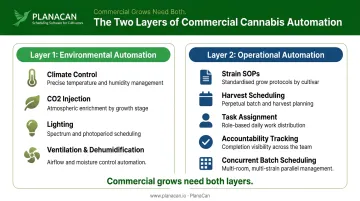
Layer 1: Environmental Automation
Environmental automation is the hardware layer. It covers:
- Climate control — temperature, relative humidity, VPD maintained via sensors and actuators
- CO2 injection — triggered by actual canopy-zone readings, not fixed schedules
- Lighting — photoperiod and intensity tied to growth stage
- Ventilation and dehumidification — responding to threshold conditions rather than timers
This layer runs 24/7 and replaces manual physical monitoring. The Resource Innovation Institute's Cannabis Controls Best Practices Guide emphasizes that sensors should be positioned at the crop zone, not at ambient room level — a common installation mistake that causes controllers to respond to conditions the plants aren't actually experiencing.
A 2022 peer-reviewed study also confirmed that CO2 distribution is uneven both horizontally and vertically in enclosed grow environments, meaning a single room-level sensor will routinely misrepresent canopy conditions.
Layer 2: Operational Automation
This layer is distinct, and it's where most commercial operations have a gap. Operational automation covers:
- Strain-specific treatment protocols and SOPs
- Harvest cycle planning across multiple flower rooms
- Task assignment to specific team members
- Daily accountability and completion tracking
- Scheduling across concurrent batches
Environmental hardware cannot manage any of this. A climate controller that maintains perfect VPD cannot tell your trimming team what room they're working in today or flag that a scouting round was missed in Room 4.
Why Operations with 5,000+ Sqft Cannot Rely on Layer 1 Alone
At single-room scale, a head grower can mentally track who's doing what. Past two flower rooms or five cultivators, that breaks down fast. When you're running six strains on staggered harvest cycles across eight rooms, you have too many moving parts for verbal coordination to hold up.
Layer 1 maintains optimal conditions. Layer 2 ensures the right person is in the right room executing the right task at the right time. Without both, environmental precision goes to waste — your conditions are dialed in while execution quietly drifts.
This is where platforms like PlanaCan address the operational gap directly. Its template builder, perpetual harvest calendar, and automatic daily notifications replace the manual communication that fails at commercial scale. Garden First Cannabis uses PlanaCan to manage 16 rotating harvests simultaneously, achieving a 36% increase in completed tasks and a 23% reduction in labor costs — outcomes tied directly to workflow automation, not environmental hardware.
Facility Prerequisites Before You Automate
Rushing into automation before your facility is ready creates expensive, hard-to-diagnose problems. Confirm these prerequisites first.
Infrastructure Requirements
- Electrical capacity — Confirm your panel has sufficient capacity for all controllers, actuators, CO2 equipment, and additional sensing hardware. RII's 2022 Facility Design Guide recommends a complete load schedule covering lighting, HVAC, dehumidification, irrigation, CO2, and controls before committing to hardware specs
- Network coverage — Map wireless dead zones throughout the facility before relying on wireless sensors; structured cabling is preferable for control-critical devices
- Equipment compatibility — Verify that existing HVAC, irrigation, and lighting equipment uses communication protocols compatible with your proposed controllers (BACnet, Modbus, 0-10V, etc.) — retrofits on incompatible systems add cost and delay
Operational Readiness
- Document protocols before deploying automation — You cannot automate an undefined process. Each strain and growth stage needs a written SOP first. If you're building these from scratch, PlanaCan's SOP and template builder lets you document protocols directly within the platform
- Assign named owners to every automated trigger — Notifications and task alerts need a real person at the other end. Define roles before go-live
Compliance Considerations
State requirements for environmental data vary significantly. Maryland explicitly requires indoor growers to monitor, record, and regulate temperature, humidity, ventilation, and lighting — and mandates calibration records. Most other states require SOP documentation, inventory records, or resource reporting but do not explicitly mandate archived room telemetry.
Before selecting an automation platform, confirm its data export format is compatible with your state's reporting requirements. PlanaCan operates as a cultivation operations layer beneath state track-and-trace systems (METRC, BioTrack, Leaf Data Systems): it handles daily workflow execution and audit-defensible documentation while the compliance platform manages regulatory seed-to-sale reporting.
How to Implement Indoor Grow Automation Step-by-Step
Implement in sequence. Running all systems simultaneously before validation makes failures much harder to isolate.
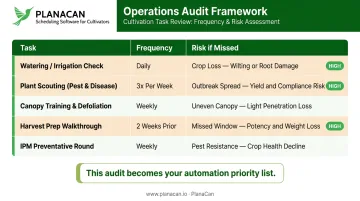
Step 1: Audit and Map Current Operations
Walk every room and document:
- Every recurring task — what it is, how often, who does it
- What happens when a task is missed (missed watering vs. missed scouting have very different consequences)
- Which tasks are highest-risk and highest-frequency
This audit becomes your automation priority list.
Step 2: Automate Environmental Controls
Deploy sensors per room — temperature, humidity, VPD, CO2, light intensity — and integrate with your environmental controller. Set threshold-based automations, not just timers, so ventilation and CO2 injection respond to actual conditions. Place sensors at canopy level. Confirm each sensor has an alarm threshold that flags readings outside plausible ranges before the controller acts on them.
Step 3: Automate Irrigation and Fertigation
Irrigation automation at commercial scale requires more than a timer. Set it up in layers:
- Integrate soil moisture or substrate sensors with irrigation controllers to trigger watering on plant uptake signals, not fixed intervals
- Program EC and pH dosing automations for consistent fertigation
- Establish manual override checkpoints a grower validates before each new growth stage begins
Fixed-interval schedules are a common source of both over-watering and under-watering once you're running multiple rooms concurrently.
Step 4: Automate Operational Scheduling and Team Workflows
Once the physical environment is stable, address the operational layer:
- Build strain-specific workflow templates that encode SOP documentation, task sequences, priority levels, and time benchmarks for each treatment
- Schedule harvest cycles on a shared calendar with visibility across all concurrent batches
- Configure automatic daily notifications so every team member knows which tasks are due in which room
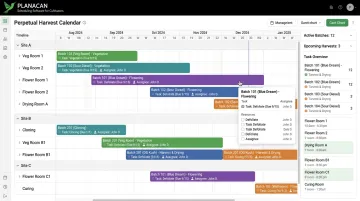
PlanaCan's Gantt chart gives operations managers visibility across every active harvest simultaneously. Drag-and-drop rescheduling cascades downstream task adjustments automatically, so when a harvest shifts, every associated task shifts with it. This eliminates the manual recalculation that makes spreadsheets unworkable past two flower rooms.
The iOS and Android apps support offline functionality on the grow floor, syncing when Wi-Fi is restored. That matters in facilities where wireless coverage is inconsistent across rooms.
Step 5: Integrate, Test, and Refine
Run all systems through a full simulated grow cycle before relying on them for live plants:
- Verify sensor readings against calibrated reference instruments
- Confirm task notifications fire correctly to the right users
- Test every manual override
- Document any automations that behave unexpectedly
Treat this as commissioning, not setup.
Common Grow Automation Challenges and How to Solve Them
Sensor Calibration Drift
pH, EC, and humidity sensors drift over time and will feed incorrect data to controllers — triggering automated responses based on false readings. No universal calibration interval applies to all sensor types, but the principle is consistent: establish a scheduled calibration routine based on your specific instruments' specifications, and set alert thresholds that flag readings outside plausible ranges. Document all calibration records — Maryland explicitly requires this, and it's good practice regardless of state.
Workflow Gaps After Hardware Automation
This is the most common failure pattern in commercial grows. Environmental and irrigation hardware is fully automated, but team tasks — scouting, training, spraying, harvest prep — are still communicated verbally or by text. The hardware cannot compensate for a missed IPM round or a delayed harvest prep checklist.
Solve this by applying the same rigor to operational task automation that you applied to hardware:
- Documented task schedules with assigned accountability
- Daily automated notifications to each team member
- Completion tracking with escalation on missed tasks
- Mobile execution so tasks are logged in real time on the floor
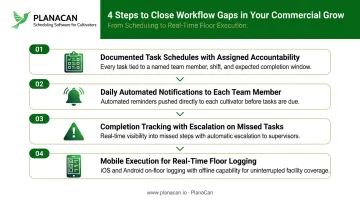
PlanaCan's offline-capable mobile app ensures cultivators can execute and log tasks even in wireless dead zones — preventing the paper-and-clipboard fallback that breaks accountability chains.
Connectivity and System Reliability
Hardware and workflow automation both depend on one underlying requirement: your systems cannot have a single point of failure. Before going live, address these three reliability fundamentals:
- Assess connectivity dependency — determine whether each control system operates locally or requires cloud access to function
- Install redundant communication pathways — cellular backup and local control capability are the baseline
- Write manual override protocols for every automated function before launch
If your team doesn't know the override procedure when a system goes offline, the operation is exposed. Document it, train to it, and keep it accessible on the floor.
Pro Tips for Scaling Grow Automation in Commercial Cannabis
Start automation with high-risk, high-frequency tasks: the ones where a miss directly hits yield or compliance. You'll see faster ROI and give your team a manageable on-ramp before expanding further.
Document every automation rule as a formal SOP before deploying it. Each entry should cover what triggers the action, the expected outcome, who monitors it, and the manual fallback. Undocumented automations become liabilities during staff turnover or state audits.
When scaling to new rooms or facilities, use your platform's template system rather than copying configurations outright. Always re-audit for strain, room, and equipment differences before deploying. PlanaCan's "create once, deploy anywhere" approach lets MSOs standardize workflows from a central point and push refined versions to every site, rather than rebuilding from scratch at each location.
Frequently Asked Questions
What is the difference between environmental automation and operational automation in a cannabis grow?
Environmental automation controls physical conditions — temperature, humidity, lighting, CO2, irrigation — through hardware. Operational automation manages team schedules, task assignments, and workflow protocols. Commercial operations need both: hardware maintains conditions, operational automation ensures people execute the right tasks at the right time.
What should a commercial cannabis operation automate first?
Environmental controls (climate, CO2, lighting) should come first since they protect plant health around the clock. Automate irrigation next, then address operational scheduling and team workflows once the physical environment is stable and validated.
How much does it cost to automate a commercial cannabis grow room?
There is no reliable single cost figure — costs vary based on number of rooms and controlled zones, new build versus retrofit, existing equipment compatibility, integration complexity, and whether irrigation automation and workflow software are included. Scope costs by control points, electrical work, commissioning, and software licensing rather than canopy square footage alone.
Can grow automation replace cultivation staff in a commercial cannabis facility?
Automation reduces repetitive monitoring and lowers labor costs — Garden First Cannabis reduced labor costs by 23% after implementing workflow automation. But skilled staff remain essential for scouting, plant training, decision-making, and harvest. Automation improves their efficiency and accountability; it doesn't replace their judgment.
What are the most common mistakes commercial growers make when automating their facility?
Three mistakes come up repeatedly:
- Automating only the hardware layer while leaving team workflows manual
- Skipping sensor calibration until readings are already inaccurate
- Failing to write manual override protocols before systems go live
How do multi-state cannabis operators manage grow automation across multiple facilities?
MSOs standardize workflow templates and SOPs centrally, then deploy them across all facilities — adapting for strain, room, and state-specific compliance differences per location. Platforms like PlanaCan support this with single-account management across 15+ states, giving operators centralized template control and cross-site visibility so no location runs in isolation.